
Digital Safety – Guidance for Parents and carers (April 2026)
The internet is undoubtedly one of the greatest ever inventions and is an extremely useful tool for entertainment, staying in touch, sharing memories as well as finding out anything and everything. However, the internet is also full of danger which children need to be safeguarded from.
Keeping up to date with what your children are doing online can seem very daunting. Technology is constantly advancing and sometimes parents feel that their children know more about the internet than they do. And we are all too aware that it is not just online activity that parents and carers need to vigilant about. A popular children’s author’s books raised a safeguarding alert due to a link in the books which, due to a change in the ownership of the domain website, now re-directs to a site containing inappropriate adult content.
Do your children and young teens know who they are talking to online? Are they too trusting?
One of the most concerning safeguarding issues is that young people are messaging via their phones or when gaming, people that they have never met and believe are a ‘friend’ or a ‘friend of a friend.’ They may have been introduced via a group chat and innocently believe that they must therefore be a friend of one of the group – this is not always the case.
We also know that these online ‘friendships’ can sometimes lead them to arrange to meet up in person. This is significant area of risk. We all know that some people are not who they say they are online – and may in fact be someone older, or the opposite sex. The key point is that the young person is too trusting and they are in contact with someone they have never actually met in person.
Childline have lots of invaluable advice for young people on this page Trusting others online. . They ask the question, have you ever lied to someone online? and explain how knowing more about trusting others online is a great way to feel more in control. To help young people, they have lots of advice on spotting fake profiles, understanding people’s online identities, and thinking about what you share with people.
There are lots of great websites designed to help parent’s and carers to keep their children as safe as possible when online. Our best single bit of advice is to be curious about what your children are doing online, take an interest in their activities and regularly check what they are doing and that they are only chatting to friends they know and have met.
“What I wish my parents or carers knew ….’a guide for parents and carers on children’s digital lives (Children’s Commissioner)
The Children’s Commissioner, Dame Rachel de Souza, has published a guide to help parents and carers navigate the challenge of managing children’s everyday online habits. Written with direct input from children and young people, including teenagers consulted in schools and the Commissioner’s Youth Ambassadors. The guide is designed to make difficult conversations easier and more regular.
The guide covers setting boundaries around phone use, talking about harmful content, and building ongoing communication that goes beyond a one-off conversation. The voice of young people runs through it, including this from one teenager: “Don’t be afraid to be firm… If you are worried your child is seeing harmful content and you don’t know what they’re watching and it’s affecting their behaviour, just take it that you know best, they don’t.”
To see more information and guidance, click on this link
Other Helpful Hints and Tips
- Check that your internet service provider provides parental controls so you can add a layer of security for your children and filter out inappropriate content. The website links below also contain advice about this. If your child has a mobile phone check the settings on this too
- Talk to your child about online safety and take an interest in their activity. Especially encourage them to talk to you about anything which is worrying them online
- Keep online passwords safe and secure and change them often. Don’t let any of your networks be open or discoverable
- Agree ground rules for safe use of the internet at home. For example limit the amount of time children can spend online in any one go and restrict access at bedtime
- Be App aware. Many devices require downloading an app. You should check the privacy settings and permissions of any apps you download, as well as the product itself.
- Be device aware. Make sure your security settings include all internet enabled devices including smart TV’s and game consoles
- Report any concerns you have. The CEOP website below is full of really helpful information.
A list of 184 gaming and social media apps commonly used by young people is available here:Social-Media-Library-April-2019. The list includes the names and description of the apps but is wise to be aware that new apps are being created all the time.

Ceop is an invaluable source of help and advice for parents and carers and has lots of information to help you keep your children safe online. You can find more information on their website by clicking here. One of the more recent gaming chat platforms to be aware of is : Discord.


WIZZ and Yubo are also relatively new and whilst they are targeted at young people, have been compared to ‘Tinder for Teens – find out more in the news article by clicking this link.‘ 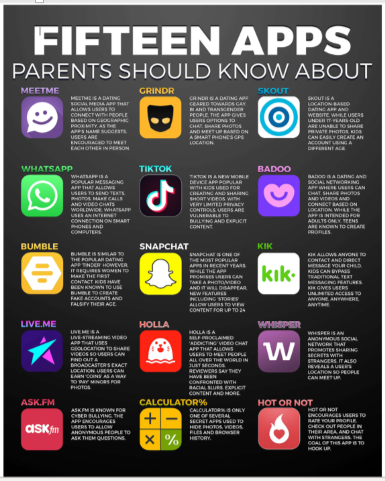
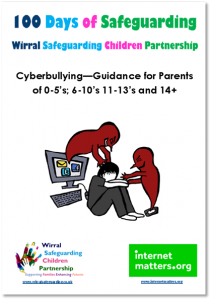
Cyberbullying Guide
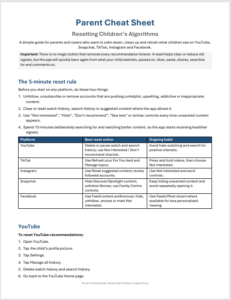
Resetting your childs algorhythms
Below is a guide that will help parents and carers to reset the algorhythms on your childs social media accounts
CEOP Website – The Child Exploitation and Online Protection Command website is part of the national Police’s response to internet safety. The website includes a function to instantly report any concerns about online behaviour.
Broadband Parental Controls – Advice to parent about setting parental controls on broadband internet from GoCompare
Safer Internet Day 2026 – Exploring the safe and responsible use of AI – Information and Resources.
Think u know website – Thinkuknow is an education programme from the National Crime Agency’s CEOP Command. Their website is full of really helpful guidance for parents, including action you can take if you are concerned about your child online.
An updated list of 184 gaming and social media apps commonly used by young people is available here: Social-Media-Library-April-2019. The list includes the names and description of the apps.
Nude Selfies and Sexting – guidance from thinkuknow
Gaming – guidance from thinkyouknow
Using Parental Controls – guidance from thinkyouknow
Keeping children safe online | NSPCC – NSPCC guidance on how to keep your child safe from online risks including talking to them about AI, and supporting your child through compulsive device use.
Safer Internet website – The UK’s safer internet centre is a government backed hub of advice, including help and advice for parents and carers.
Internet Matters website – This website offers a number of useful guides about online safety for parents and carers
Please note the WSCP is not responsible for the content of external websites.